Blog

  • mec2

    mec2

    --{{0}}--
    

    This document defines some basic macros for applying the
    mec2 2D physics simulation in
    LiaScript.

    Try it on LiaScript:

    https://liascript.github.io/course/?https://raw.githubusercontent.com/LiaTemplates/mec2/main/README.md

    See the project on Github:

    https://github.com/liaTemplates/mec2

    --{{1}}--
    

    There are three ways to use this template. The easiest way is to use the
    import statement and the url of the raw text-file of the master branch or any
    other branch or version. But you can also copy the required functionionality
    directly into the header of your Markdown document, see therefor the
    last slide. And of course, you could also clone this project
    and change it, as you wish.

    {{1}}
    
    1. Load the macros via

      import: https://raw.githubusercontent.com/LiaTemplates/mec2/main/README.md

    2. Copy the definitions into your Project

    3. Clone this repository on GitHub

    @mec2

    --{{0}}--
    

    Simply add @mec2 directly to the head of your Markdown code-snippet to execute
    it directly within LiaScript.

    {
      "id":"chaos-pendulums",
      "gravity":true,
      "nodes": [
        { "id":"A0","x":200,"y":400,"base":true },
        { "id":"A1","x":280,"y":480,"m":2 },
        { "id":"B1","x":279,"y":481,"m":2 },
        { "id":"C1","x":278,"y":482,"m":2 },
        { "id":"D1","x":277,"y":483,"m":2 },
        { "id":"A2","x":360,"y":560,"m":3 },
        { "id":"B2","x":359,"y":561,"m":3 },
        { "id":"C2","x":358,"y":562,"m":3 },
        { "id":"D2","x":357,"y":563,"m":3 },
        { "id":"A3","x":440,"y":640,"m":4.7 },
        { "id":"B3","x":439,"y":641,"m":4.7 },
        { "id":"C3","x":438,"y":642,"m":4.7 },
        { "id":"D3","x":437,"y":643,"m":4.7 }
      ],
      "constraints": [
        { "id":"a1","p1":"A0","p2":"A1","len":{ "type":"const" } },
        { "id":"a2","p1":"A1","p2":"A2","len":{ "type":"const" } },
        { "id":"a3","p1":"A2","p2":"A3","len":{ "type":"const" } },
        { "id":"b1","p1":"A0","p2":"B1","len":{ "type":"const" } },
        { "id":"b2","p1":"B1","p2":"B2","len":{ "type":"const" } },
        { "id":"b3","p1":"B2","p2":"B3","len":{ "type":"const" } },
        { "id":"c1","p1":"A0","p2":"C1","len":{ "type":"const" } },
        { "id":"c2","p1":"C1","p2":"C2","len":{ "type":"const" } },
        { "id":"c3","p1":"C2","p2":"C3","len":{ "type":"const" } },
        { "id":"d1","p1":"A0","p2":"D1","len":{ "type":"const" } },
        { "id":"d2","p1":"D1","p2":"D2","len":{ "type":"const" } },
        { "id":"d3","p1":"D2","p2":"D3","len":{ "type":"const" } }
      ],
      "views": [
        { "show":"pos","of":"A3","as":"trace","id":"view1","stroke":"rgba(255,0,0,.5)" },
        { "show":"pos","of":"B3","as":"trace","id":"view2","stroke":"rgba(0,255,0,.5)" },
        { "show":"pos","of":"C3","as":"trace","id":"view3","stroke":"rgba(255,255,0,.5)" },
        { "show":"pos","of":"D3","as":"trace","id":"view4","stroke":"rgba(255,0,255,.5)" }
      ]
    }

    @mec2.eval

    --{{0}}--
    

    Attach @mec2.eval to the end of your Markdown code-snippet to create an
    editable and executeable simulation.

    {
      "id":"chaos-pendulums",
      "gravity":true,
      "nodes": [
        { "id":"A0","x":200,"y":400,"base":true },
        { "id":"A1","x":280,"y":480,"m":2 },
        { "id":"B1","x":279,"y":481,"m":2 },
        { "id":"C1","x":278,"y":482,"m":2 },
        { "id":"D1","x":277,"y":483,"m":2 },
        { "id":"A2","x":360,"y":560,"m":3 },
        { "id":"B2","x":359,"y":561,"m":3 },
        { "id":"C2","x":358,"y":562,"m":3 },
        { "id":"D2","x":357,"y":563,"m":3 },
        { "id":"A3","x":440,"y":640,"m":4.7 },
        { "id":"B3","x":439,"y":641,"m":4.7 },
        { "id":"C3","x":438,"y":642,"m":4.7 },
        { "id":"D3","x":437,"y":643,"m":4.7 }
      ],
      "constraints": [
        { "id":"a1","p1":"A0","p2":"A1","len":{ "type":"const" } },
        { "id":"a2","p1":"A1","p2":"A2","len":{ "type":"const" } },
        { "id":"a3","p1":"A2","p2":"A3","len":{ "type":"const" } },
        { "id":"b1","p1":"A0","p2":"B1","len":{ "type":"const" } },
        { "id":"b2","p1":"B1","p2":"B2","len":{ "type":"const" } },
        { "id":"b3","p1":"B2","p2":"B3","len":{ "type":"const" } },
        { "id":"c1","p1":"A0","p2":"C1","len":{ "type":"const" } },
        { "id":"c2","p1":"C1","p2":"C2","len":{ "type":"const" } },
        { "id":"c3","p1":"C2","p2":"C3","len":{ "type":"const" } },
        { "id":"d1","p1":"A0","p2":"D1","len":{ "type":"const" } },
        { "id":"d2","p1":"D1","p2":"D2","len":{ "type":"const" } },
        { "id":"d3","p1":"D2","p2":"D3","len":{ "type":"const" } }
      ],
      "views": [
        { "show":"pos","of":"A3","as":"trace","id":"view1","stroke":"rgba(255,0,0,.5)" },
        { "show":"pos","of":"B3","as":"trace","id":"view2","stroke":"rgba(0,255,0,.5)" },
        { "show":"pos","of":"C3","as":"trace","id":"view3","stroke":"rgba(255,255,0,.5)" },
        { "show":"pos","of":"D3","as":"trace","id":"view4","stroke":"rgba(255,0,255,.5)" }
      ]
    }

    @mec2.eval

    Implementation

    script: https://jauhl.github.io/mecEdit/scripts/g2.js
            https://jauhl.github.io/mecEdit/scripts/mec2.min.js
            https://jauhl.github.io/mecEdit/scripts/mecelement/canvasInteractor.js
            https://jauhl.github.io/mecEdit/scripts/mecelement/g2.selector.js
            https://jauhl.github.io/mecEdit/scripts/mecelement/mec.htmlelement.js
    
    
    @mec2
    <lia-keep>
    <MEC-2 width=800 height=600 grid cartesian darkmode x0=385 y0=139 >
    @0
    </MEC-2>
    </lia-keep>
    @end
    
    @mec2.eval: @mec2.eval_(@uid)
    
    @mec2.eval_
    <script>
    let json=`@input`
    
    document.getElementById("@0").innerHTML = "<MEC-2 id='test' width=1530 height=680 grid cartesian darkmode x0=385 y0=139 >" + json + "</MEC-2>"
    
    "LIA: stop"
    </script>
    
    <div id="@0"></div>
    
    @end

    Visit original content creator repository

  • zotero-pdf-custom-rename

    Zotero PDF Rename

    zotero target version Latest release code size Downloads latest release License Using Zotero Plugin Template

    This is a Zotero plugin that allows you to rename PDF files in your Zotero library using custom rules.

    Note: This plugin only works on Zotero 7.0 and above.

    Usage

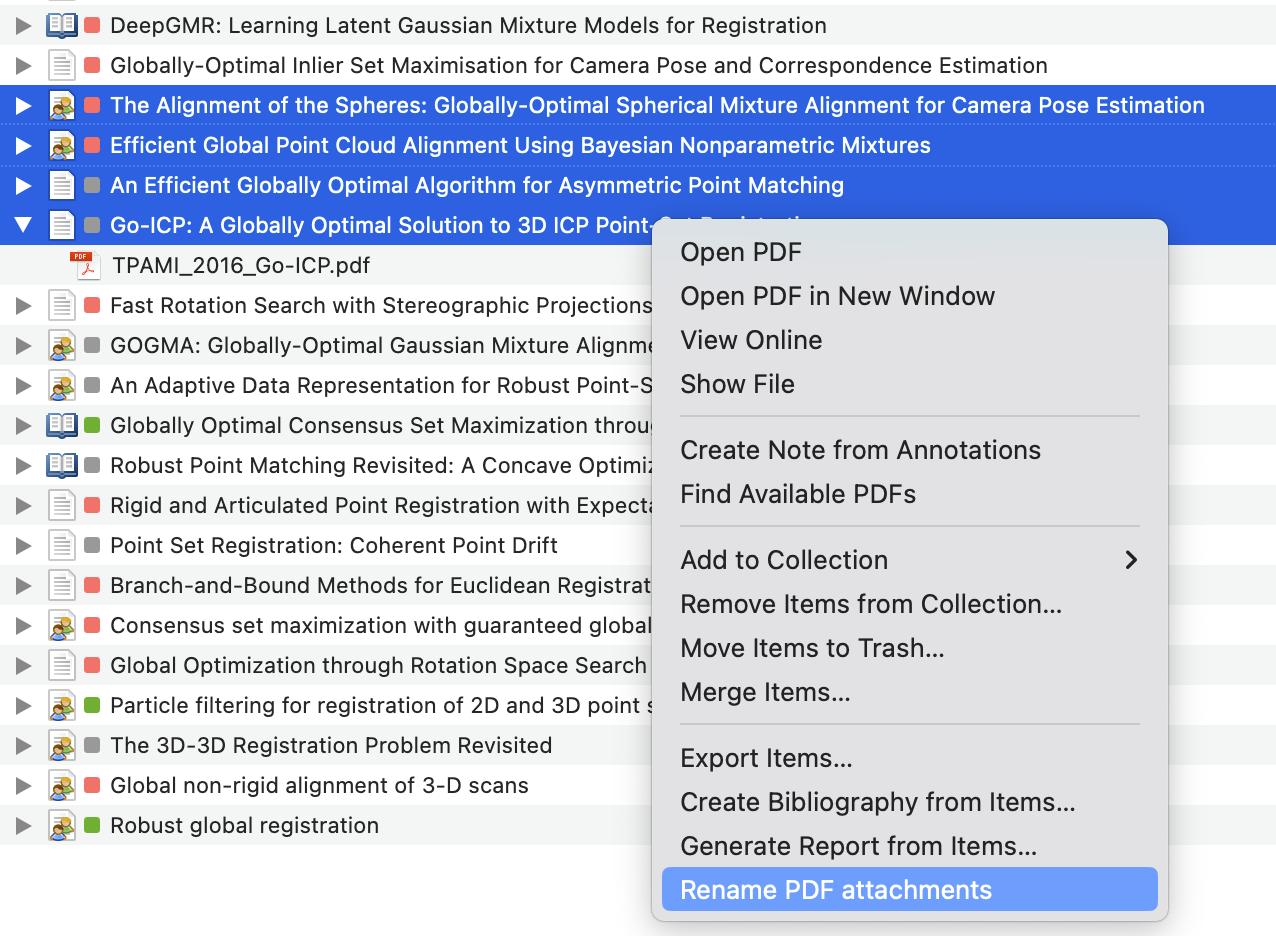
    Select one or more items in your Zotero library and right click to open the context menu. Select Rename PDF attachments from the menu.

    image

    Then the PDF files will be renamed according to the custom rules you set in the plugin preferences(not implemented yet).

    Default rules

    This plugin will read the journal name and year from the metadata of the item and rename the PDF file as follows:

    {short journal name}_{year}_{short title}.pdf
    

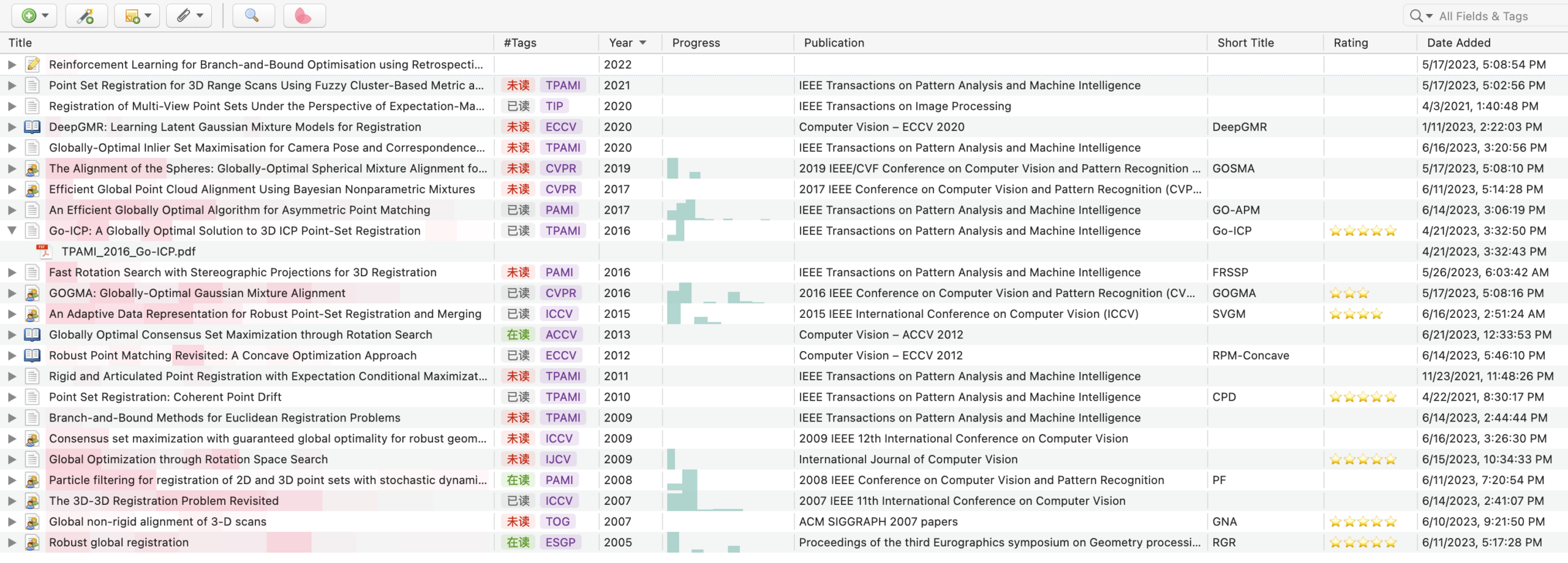
    For example, the PDF file of the item below will be renamed as TPAMI_2016_Go-ICP.pdf.

    The short title is read from the Short Title field of the item. If the Short Title field is empty, the plugin will use the Title field instead.

    Journal tags

    The short journal name is generated by selecting the first capital letter of each word in the journal name. For example, IEEE Transactions on Pattern Analysis and Machine Intelligence will be converted to TPAMI, while IEEE will be ignored.

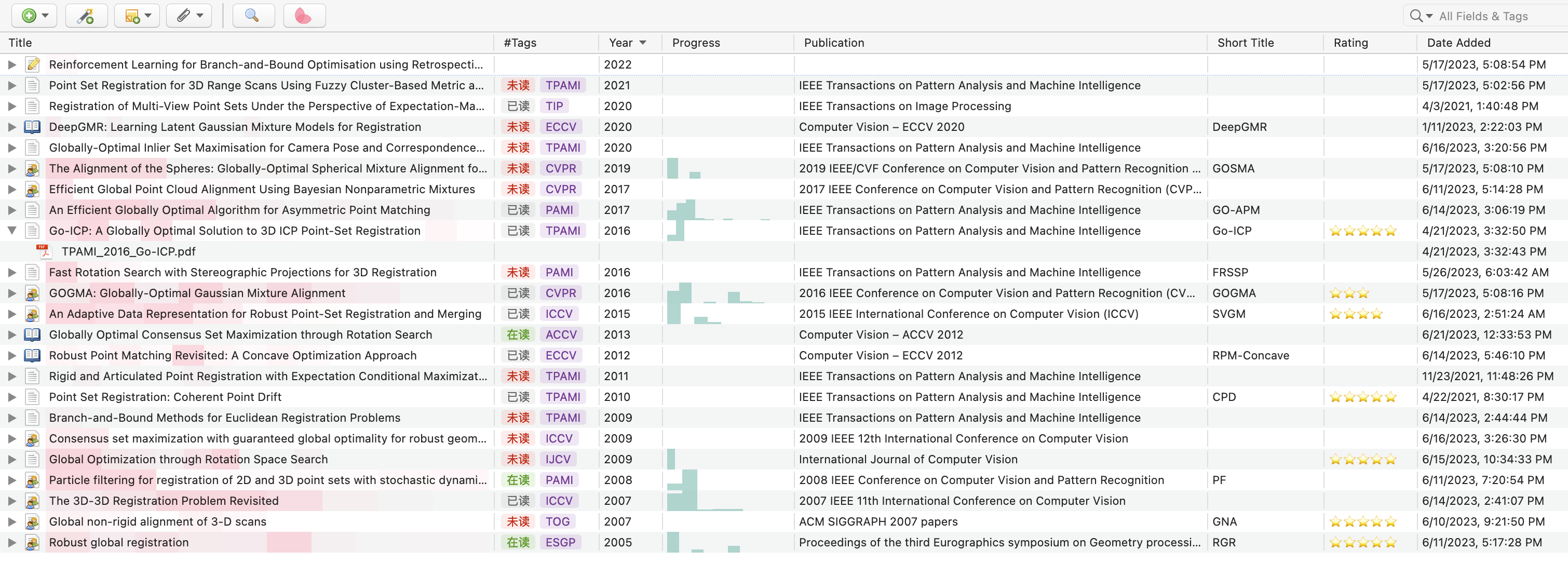
    However, ACM Transactions on Graphics will be converted to TG rather than TOG in current version. This is because the word on is ignored in the conversion. A better method is manually adding the short name of the journal in the Tags of the item.

    For example, you can add Jab/#TOG to the Tags of the item, and the plugin will use TOG as the short name of the journal.

    Note: the plugin will first read the Jab/# tag in the Tags as the short name. If there is no Jab/# tag, the plugin will automatically extract the short name from the full name of the journal.

    PS: It is recommended to install the plugin MuiseDestiny/zotero-style for a better experience.

    Xnip2023-06-22_21-14-44

    Short Cut

    Now, we can use control+D to rename the PDF files. Moreover, we can customize the short cut in the Preferences of Zotero.

    The custom short cut can be a combination of the modifier keys and another key. The modifier keys can be alt, control, meta and accel, while another key can be any key on the keyboard.

    The following table shows the corresponding modifier keys on Windows and Mac.

    modifier Windows Mac
    alt Alt ⌥ Option
    control Ctrl ⌃ Control
    meta Not supported ⌘ Command
    accel Ctrl ⌘ Command

    Future work

    • Add a short cut for the renaming function
    • Preferences panel to allow users to customize the rules.
    • Better way to extract the short name of the journal.
    Visit original content creator repository
  • xc-bela-cmake

    xc-bela-cmake

    This repository (should) contain all you need to cross compile on Ubuntu for the bela plaftorm with the following toolchain

    • Linaro 7 for C++17 support
    • cmake >= 3.6
    • qemu-arm-static for local emulation & testing
    • VSCode integration
    • clangd integration

    This is a first really quick draft to start sharing it. If you notice anything please don’t hesitate to open an issue, I’d like to help as much as possible.

    Setup

    Prerequisites

    On Ubuntu you’ll probably requires this packages :

    apt-get install build-essentials cmake git qemu-user-static clangd gdb-multiarch

    Then clone the repo :

    git clone --recurse-submodules git@github.com:maxmarsc/xc-bela-cmake.git

    Linaro

    # Linaro
    mkdir /usr/local/linaro
    sudo chmod 777 /usr/local/linaro/
    cd /usr/local/linaro
    wget https://releases.linaro.org/components/toolchain/binaries/7.5-2019.12/arm-linux-gnueabihf/gcc-linaro-7.5.0-2019.12-x86_64_arm-linux-gnueabihf.tar.xz
    tar xf gcc-linaro-7.5.0-2019.12-x86_64_arm-linux-gnueabihf.tar.xz
    mv gcc-linaro-7.5.0-2019.12-x86_64_arm-linux-gnueabihf arm-bela-linux-gnueabihf
    rm -r gcc-linaro-7.5.0-2019.12.02-x86_64_arm-linux-gnueabihf.tar.xz

    Bela librairies and headers

    Warning : this could delete the projects located on your board, in doubt make a backup

    # Build the libraries -- needs the Bela board to be connected
    scp BelaExtras/CustomMakefile* root@bela.local:~/Bela
    ssh root@bela.local "cd Bela && rm lib/*"
    ssh root@bela.local "cd Bela && make -f Makefile.libraries cleanall && make -f Makefile.libraries all"
    ssh root@bela.local "cd Bela && make lib && make libbelafull"
    
    # Bela Sysroot -- needs the Bela board to be connected
    ./BelaExtras/SyncBelaSysroot.sh
    
    # Additional step to install gdbserver on the board for remote debugging
    ssh root@bela.local "apt-get install -y gdbserver"
    

    Build & testing

    To build with cmake on the command line run :

    cmake -B build -DCMAKE_TOOLCHAIN_FILE:FILEPATH=Toolchain.cmake .
    cmake --build build -j$(nproc) --target bela_executable

    Testing

    CMake is preconfigured to call qemu-arm-static to run any Bela executable on your machine. If you want to do it manually you can do it this way :

    qemu-arm-static -L /usr/local/linaro/arm-bela-linux-gnueabihf/arm-linux-gnueabihf/libc <your_executable>

    VSCode integration

    I try to integrate as much as I could into VSCode workflow. I suggest the following extensions :

    Once the toolchain is selected for cmake you can use the CMake integration quite easily

    Debugging targets

    I provided two debugging targets (using the native-debugger extension):

    • [Tests] Attach to local gdbserver : localy run tests using qemu, default to build/bin/tests
    • [Belacid] Attach to gdbserver : remotly start the exectuable with gdbserver on the Bela board and connect to it with gdb-multiarch

    Kudos

    Thanks to these repos for hints & tips,

    Visit original content creator repository

  • react-form-material-ui

    material-ui Inputs for React Form Base

    material-ui input bindings for react-form-base.

    build status npm version

    Installation

    npm install --save react-form-material-ui
    

    Usage

    For a more detailed information on core functionality of react-form-base, take a look at react-form-base demo. To see a sample usage of this package components, you may want to look at react-form-material-ui components demo.

    Example

    import Form, {
      TextField,
      DatePicker,
      SelectField,
      Checkbox,
      Toggle,
      Slider,
      RadioButtonGroup,
      RadioButton
    } from 'react-form-material-ui';
    
    const colors = [
      'Red', 'Orange', 'Yellow', 'Green', 'Blue', 'Purple', 'Black', 'White'
    ];
    
    export default class MyForm extends Form {
      render() {
        return (
          <div>
            <TextField {...this.$('fullName')} floatingLabelText="Full Name" />
            <DatePicker {...this.$('birthDate')} hintText="Birth Date" />
            <SelectField {...this.$('hairColor')} options={colors} floatingLabelText="Hair Color" />
            <AutoComplete
              hintText="Eye Color"
              dataSource={colors}
              filter={(value, key) => (key.indexOf(value) !== -1)}
              openOnFocus
            />
            <RadioButtonGroup {...this.$('sex')}>
              <RadioButton value="male" label="Male" />
              <RadioButton value="female" label="Female" />
            </RadioButtonGroup>
            <Slider {...this.$('tanLevel')} />
            <Checkbox {...this.$('admin')} label="Admin" />
            <Toggle {...this.$('extraFeatures')} label="Extra Features" />
          </div>
        );
      }
    }

    DialogForm Example

    import Form, { Dialog, TextField } from 'react-form-material-ui';
    import FlatButton from 'material-ui/FlatButton';
    
    export default class MyDialogForm extends Dialog(Form) {
      // title may be passed in props, or can be rendered dynamically (based on
      // form's attrs, for example) via getTitle method:
      getTitle() {
        return this.get('id') ? this.get('name') : 'New Item';
      }
    
      // actions may be passed in props, or they can be set dynamically. Bellow is
      // what DialogForm uses for actions by default if they are not passed in props.
      // You don't need to overload it if 2 buttons is what your DialogForm needs to have.
      getActions() {
        return [
          <FlatButton label={closeLabel} onTouchTap={this.props.onRequestClose} />,
          <FlatButton label={saveLabel} primary onTouchTap={() => this.save()} />
        ];
      }
    
      // NOTE: in DialogForm you have to use form's $render helper method for rendering
      // form content. Generally, this is optional (yet recommended) way of rendering,
      // but is mandatory in case of DialogForm.
      $render($) {
        <div>
          <div><TextField {...$('email')} floatingLabelText="Email" /></div>
          <div><TextField {...$('firstName')} floatingLabelText="First Name" /></div>
          <div><TextField {...$('lastName')} floatingLabelText="Last Name" /></div>
        </div>
      }
    }

    Dialog function

    Note that in the example above MyDialogForm is extended from a class generated by a Dialog(Form) function call. The reason of such implementation is that you most likely will have base form class in your application, where all your validations and custom behavior will be defined. And to be able to reuse all this functionality, any dialog form has to be inherited from this base form of yours. Thus, in real-life situations you probably will have something like that:

    import { Dialog } from 'react-form-material-ui';
    import Form from 'your-base-form';
    
    export default class ItemForm extends Dialog(Form) {
      // form definitions...
    }

    NOTE: the full signature of Dialog function is following:

    function Dialog(Form, { Component = MaterialDialog } = {})

    where MaterialDialog stands for material-ui‘s Dialog component. This means that in special cases you can use your own dialog containers to render form’s body.

    Component Props

    Dialog Form

    Dialog form component renders it’s content within material-ui‘s Dialog component (by default). In addition to react-form-base‘s Form API methods there are 2 additional methods available for Dialog forms:

    • getTitle(): overload it to set form’s dialog title on rendering, if you don’t want to pass it in props.

    • getActions(): overload it if you want your dialog form to have something different from ‘Cancel’-‘Save’ actions. Or you can pass actions in props without overloading this method.

    Prop Name Spec Description
    saveLabel PropTypes.string. Defaults to 'Save' label for ‘save’ primary action button that is one of 2 buttons that DialogForm generates by default.
    cancelLabel PropTypes.string. Defaults to 'Cancel' label for ‘cancel’ action button that is one of 2 buttons that DialogForm generates by default.
    ...rest the rest of props are delegated to internal Dialog component.

    Input Components

    All input components receive value, onChange, error and name properties from react-form-base API (this props generated via form’s $ method).

    Bellow are the specs for other properties that components work with.

    TextField

    This component is a simple wrapper around material-ui‘s TextField component.

    Prop Name Spec Description
    ...rest the rest of props are delegated to internal TextField component.

    DatePicker

    Prop Name Spec Description
    wrapperClassName PropTypes.string className for the root component element (div), which wraps DatePicker component and error’s div, which is rendered if input has validation errors.
    errorClassName PropTypes.string. Defaults to 'error' className for internal error element (div), which is rendered if error is present.
    ...rest the rest of props are delegated to internal DatePicker component.

    SelectField

    Prop Name Spec Description
    options
    PropTypes.arrayOf(
      PropTypes.oneOfType([
        PropTypes.number,
        PropTypes.string,
        PropTypes.shape({
          value: PropTypes.oneOfType([
            PropTypes.string,
            PropTypes.number
          ]),
          text: PropTypes.string
        })
      ])
    )
    options to be rendered (as MenuItems) within internal SelectField component. If array of strings or integers is passed, it’s values are used as options’ texts and values. If array of objects is passed, each object should have value and text properties.
    children PropTypes.node Can be used to render options manually. Overrides options prop.
    includeBlank PropTypes.oneOf([ 'floatingLabelText', 'hintText' ]) When this property is set and input has non-empty value, additional option will be rendered within the input. It will have a blank value and text that corresponds to the value of prop itself. This behavior can be used to “drop” the value of input after some option has been selected.
    ...rest the rest of props are delegated to the internal SelectField component.

    AutoComplete

    This component is a simple wrapper around material-ui‘s AutoComplete component. It’s main purpose is to map form’s props into AutoComplete’s analogs: value is passed as searchText, error as errorText, and appropriate onUpdateInput prop is generated to match form’s onChange API requirements (new value should be passed as first argument).

    Prop Name Spec Description
    ...rest the rest of props are delegated to internal AutoComplete component.

    RadioButtonGroup

    Prop Name Spec Description
    options
    PropTypes.arrayOf(
      PropTypes.oneOfType([
        PropTypes.number,
        PropTypes.string,
        PropTypes.bool,
        PropTypes.shape({
          value: PropTypes.oneOfType([
            PropTypes.string,
            PropTypes.number,
            PropTypes.bool
          ]),
          label: PropTypes.string
        })
      ])
    )
    options to be rendered (as RadioButtons) within internal RadioButton component. If array of strings or integers is passed, it’s values are used as options’ values and labels. If array of objects is passed, each object should have value and label properties.
    children PropTypes.node Can be used to render options manually. Overrides options prop.
    wrapperClassName PropTypes.string className for the root component element (div), which wraps RadioButtonGroup component and error’s div, which is rendered if input has validation errors.
    errorClassName PropTypes.string. Defaults to 'error' className for internal error element (div), which is rendered if error is present.
    ...rest the rest of props are delegated to the internal RadioButtonGroup component.

    Checkbox

    Prop Name Spec Description
    wrapperClassName PropTypes.string className for the root component element (div), which wraps Checkbox component and error’s div, which is rendered if input has validation errors.
    errorClassName PropTypes.string. Defaults to 'error' className for internal error element (div), which is rendered if error is present.
    ...rest the rest of props are delegated to internal Checkbox component.

    Toggle

    Prop Name Spec Description
    wrapperClassName PropTypes.string className for the root component element (div), which wraps Toggle component and error’s div, which is rendered if input has validation errors.
    errorClassName PropTypes.string. Defaults to 'error' className for internal error element (div), which is rendered if error is present.
    ...rest the rest of props are delegated to internal Toggle component.

    Slider

    Prop Name Spec Description
    wrapperClassName PropTypes.string className for the root component element (div), which wraps Slider component and error’s div, which is rendered if input has validation errors.
    errorClassName PropTypes.string. Defaults to 'error' className for internal error element (div), which is rendered if error is present.
    ...rest the rest of props are delegated to internal Slider component.

    Credits

    Hugs and thanks to ogrechishkina for her support and building all of the CSS for demo application.

    License

    MIT

    Visit original content creator repository
  • hx-neutralino

    hx-neutralino

    POC of using Haxe and Neutralino

    Read more about it in the README_HAXE.MD!

    how to get started Neutralinojs

    We begin with the installing the Typescript starter project for Neutralinojs

    tl;dr (Neutralinojs)

    # install neutralino cli
    $ npm i -g @neutralinojs/neu
    
    # create a typescript neutrolin app
    $ neu create myapp --template ts
    $ cd myapp
    
    # build project
    $ neu build

    Get started (Neutralinojs)

    Install neu-cli

    $ npm i -g @neutralinojs/neu

    Create Neutralino app with Typescript template

    $ neu create myapp --template ts
    $ cd myapp

    Bundle source files

    $ neu build

    Learn more about neu-cli from docs

    Haxe

    The haxe part:

    tl;dr (Haxe)

    # install dts2hx via npm
    npm install dts2hx --save-dev
    
    # copy typescript file to correct folder
    mkdir -p node_modules/@types/neutralino
    cp -i src/index.d.ts node_modules/@types/neutralino/index.d.ts
    
    # convert typescript files to hx
    npx dts2hx neutralino/index.d.ts
    

    Get started (Haxe)

    Install dts2hx via npm, we will us that to generate externs for Haxe

    # install dts2hx via npm
    npm install dts2hx --save-dev
    

    Copy file to correct folder to convert to externs

    Currently dts2hx expects the ts files to be in a repo in node_modules,
    to get that working we just copy the files to that folder.

    # copy typescript file to correct folder
    mkdir -p node_modules/@types/neutralino
    cp -i src/index.d.ts node_modules/@types/neutralino/index.d.ts
    

    And convert the typescript files to Haxe externs

    # convert typescript files to hx
    npx dts2hx neutralino/index.d.ts
    

    The Haxe externs

    structure

    you will end up with a tree structure like this

    .
    ├── LICENSE
    ├── README.md
    ├── app
    │   ├── assets
    │   │   ├── app.css
    │   │   ├── app.js
    │   │   └── neutralino.js
    │   ├── index.html
    │   ├── settings-browser.json
    │   ├── settings-cloud.json
    │   └── settings.json
    ├── externs
    │   ├── global
    │   │   ├── IndexGlobal.hx
    │   │   ├── Neutralino.hx
    │   │   └── neutralino
    │   │       ├── App.hx
    │   │       ├── AppMode.hx
    │   │       ├── Computer.hx
    │   │       ├── Debug.hx
    │   │       ├── DirectoryData.hx
    │   │       ├── FileData.hx
    │   │       ├── Filesystem.hx
    │   │       ├── InitOptions.hx
    │   │       ├── LogSuccessData.hx
    │   │       ├── LogType.hx
    │   │       ├── Os.hx
    │   │       ├── RamData.hx
    │   │       ├── Settings.hx
    │   │       ├── SettingsData.hx
    │   │       ├── StdoutData.hx
    │   │       ├── Storage.hx
    │   │       ├── StoragePutData.hx
    │   │       ├── SuccessData.hx
    │   │       └── ValueData.hx
    │   └── ts
    │       └── Tuple1.hx
    ├── hx-neutralino-linux
    ├── hx-neutralino-mac
    ├── hx-neutralino-win.exe
    ├── neutralino.png
    ├── neutralinojs.log
    ├── package-lock.json
    ├── package.json
    ├── src
    │   ├── app-core
    │   │   └── lib.ts
    │   ├── app.ts
    │   ├── index.d.ts
    │   ├── mycss.css
    │   └── mycss2.css
    ├── storage
    ├── tsconfig.json
    └── webpack.config.js
    

    Set up Haxe

    For now this will bypass the whole webpacker setup

    build.hxml

    --class-path hx
    --class-path externs
    --main Main
    --js app/assets/app.js
    --dce full
    -D js-es=6

    haxe-loader

    install haxe-loader (https://github.com/jasononeil/webpack-haxe-loader)

    haxelib install haxe-loader
    npm install --save-dev css-loader file-loader haxe-loader

    and uninstall
    npm uninstall typescript ts-loader

    example

    source: https://github.com/elsassph/webpack-haxe-example/blob/vanilla/package.json

    Improvement

    Visit original content creator repository

  • redcap

    REDCap

    JavaScript Style Guide current version install size

    classes for interacting with REDCap projects

    REDCapAPI

    an opinionated, JSON-only, zero-dependency REDCap API implementation as an ECMAScript module

    Example

    import REDCapAPI from '@robireton/redcap/api'
    
    const endpoint = process.env.REDCAP_ENDPOINT
    const token = process.env.REDCAP_TOKEN
    
    const project = new REDCapAPI(endpoint, token)
    console.log(await project.metadata())

    Constructor

    REDCapAPI(endpoint, token)

    name value
    endpoint a URL or string to connect to – e.g. https://redcap.server.org/api/
    token the API token specific to your REDCap project and username (each token is unique to each user for each project)
    Instance methods

    name value
    options an optional object with extra parameters for REDCap API calls

    async version()

    returns the current REDCap version number as plain text (e.g., 4.13.18, 5.12.2, 6.0.0)

    async project ()

    returns an object with the following fields:

    • project_id
    • project_title
    • creation_time
    • production_time
    • in_production
    • project_language
    • purpose
    • purpose_other
    • project_notes
    • custom_record_label
    • secondary_unique_field
    • is_longitudinal
    • has_repeating_instruments_or_events
    • surveys_enabled
    • scheduling_enabled
    • record_autonumbering_enabled
    • randomization_enabled
    • ddp_enabled
    • project_irb_number
    • project_grant_number
    • project_pi_firstname
    • project_pi_lastname
    • display_today_now_button
    • missing_data_codes
    • external_modules
    • bypass_branching_erase_field_prompt

    async metadata (options)

    returns an array of data dictionary objects

    options
    • fields: an array of field names specifying specific fields you wish to pull (default: all fields)
    • forms: an array of form names specifying specific data collection instruments for which you wish to pull metadata (default: all instruments)

    async records (options)

    returns an array of record objects

    options
    • type: flat (default) — one record per row or eavone data point per row
    • records: an array of record names specifying specific fields you wish to pull (default: all records)
    • fields: an array of field names specifying specific fields you wish to pull (default: all fields)
    • forms: an array of form names specifying specific data collection instruments for which you wish to pull metadata (default: all instruments)
    • events: an array of unique event names that you wish to pull records for (longitudinal projects only)
    • more… c.f. full REDCap API specification

    async events (options)

    async arms (options)

    async fields (options)

    Returns an array of the export/import-specific version of field name objects for all fields (or for one field, if desired). Each object will contain: original_field_name, choice_value, and export_field_name. The choice_value attribute represents the raw coded value for a checkbox choice. For non-checkbox fields, the choice_value attribute will always be blank/empty. The export_field_name attribute represents the export/import-specific version of that field name.

    async instruments ()

    returns an array of instrument (Data Entry Form) objects

    async mapping (options)

    async repeating ()

    async write (data, options)

    async file (options)

    async upload (file, options)

    REDCapProject

    class for working with project structure and data; uses REDCapAPI or local JSON files

    Example

    import REDCapAPI from '@robireton/redcap/project'
    
    const endpoint = process.env.REDCAP_ENDPOINT
    const token = process.env.REDCAP_TOKEN
    
    const project = new REDCapProject(endpoint, token)
    await project.populate()
    
    console.log(project.info.title)
    for (const instrument of project.instruments) {
      console.log(instrument.label)
      for (const record of instrument.records) {
        
      }
    }

    Constructor

    REDCapProject(endpoint, token)

    name value
    endpoint a URL or string to connect to – e.g. https://redcap.server.org/api/
    token the API token specific to your REDCap project and username (each token is unique to each user for each project)

    Alternately, if endpoint/token resolves to an existing filesystem folder with appropriately-named JSON files, these will be used instead of REDCapAPI.

    Instance methods

    async populate ()

    This must be run before any instance members are accessible.

    getInstrument (name)

    returns a REDCapInstrument object, which includes the records

    REDCapProjectInformation

    REDCapField

    REDCapInstrument

    REDCapDatetime

    Visit original content creator repository
  • bilidown

    Bilidown

    GitHub Release

    哔哩哔哩视频解析下载工具,支持 8K 视频、Hi-Res 音频、杜比视界下载、批量解析,可扫码登录,常驻托盘。

    支持解析的链接类型

    使用说明

    1. Releases 下载适合您系统版本的安装包
    2. 非 Windows 系统,请先安装 FFmpeg 工具
    3. 将安装包解压后执行即可

    软件特色

    1. 前端采用 BootstrapVanJS 构建,轻量美观
    2. 后端使用 Go 语言开发,数据库采用 SQlite,简化构建和部署过程
    3. 前端通过 p-queue 控制并发请求,加快批量解析速度

    其他说明

    • 本程序不支持也不建议 HTTP 代理,直接使用国内网络访问能提升批量解析的成功率和稳定性。

    打包可执行文件

    git clone https://github.com/iuroc/bilidown
    cd bilidown/client
    pnpm install
    pnpm build
    cd ../server
    go mod tidy
    CGO_ENABLED=1 go build

    交叉编译

    说明

    • 镜像名称:iuroc/cgo-cross-build
    • 支持的系统架构
      • linux/amd64
      • windows/amd64
      • windows/386
      • windows/arm64
      • darwin/amd64
      • darwin/arm64

    拉取镜像和项目源码

    docker pull iuroc/cgo-cross-build:latest
    git clone https://github.com/iuroc/bilidown

    交叉编译发行版

    • 执行 goreleaser 命令时将自动执行 pnpm buildgo mod tidy
    cd bilidown/server
    # [交叉编译 Releases]
    docker run --rm -v .:/usr/src/data iuroc/cgo-cross-build goreleaser release --snapshot --clean
    
    # [交互式终端]
    cd bilidown
    docker run --rm -it -v .:/usr/src/data iuroc/cgo-cross-build

    编译指定系统架构

    cd bilidown/server
    
    # [DEFAULT: linux-amd64]
    docker run --rm -v .:/usr/src/data iuroc/cgo-cross-build go build -o dist/bilidown-linux-amd64/bilidown
    
    # [darwin-amd64]
    docker run --rm -v .:/usr/src/data -e GOOS=darwin -e GOARCH=amd64 -e CC=o64-clang -e CGO_ENABLED=1 iuroc/cgo-cross-build go build -o dist/bilidown-darwin-amd64/bilidown

    非 Docker 环境编译

    在 Linux amd64 平台上执行 go build 时,您可能需要安装以下依赖包:

    sudo apt install pkg-config gcc libayatana-appindicator3-dev

    开发环境

    # client
    pnpm install
    pnpm dev
    # server
    go build && ./bilidown

    特别感谢

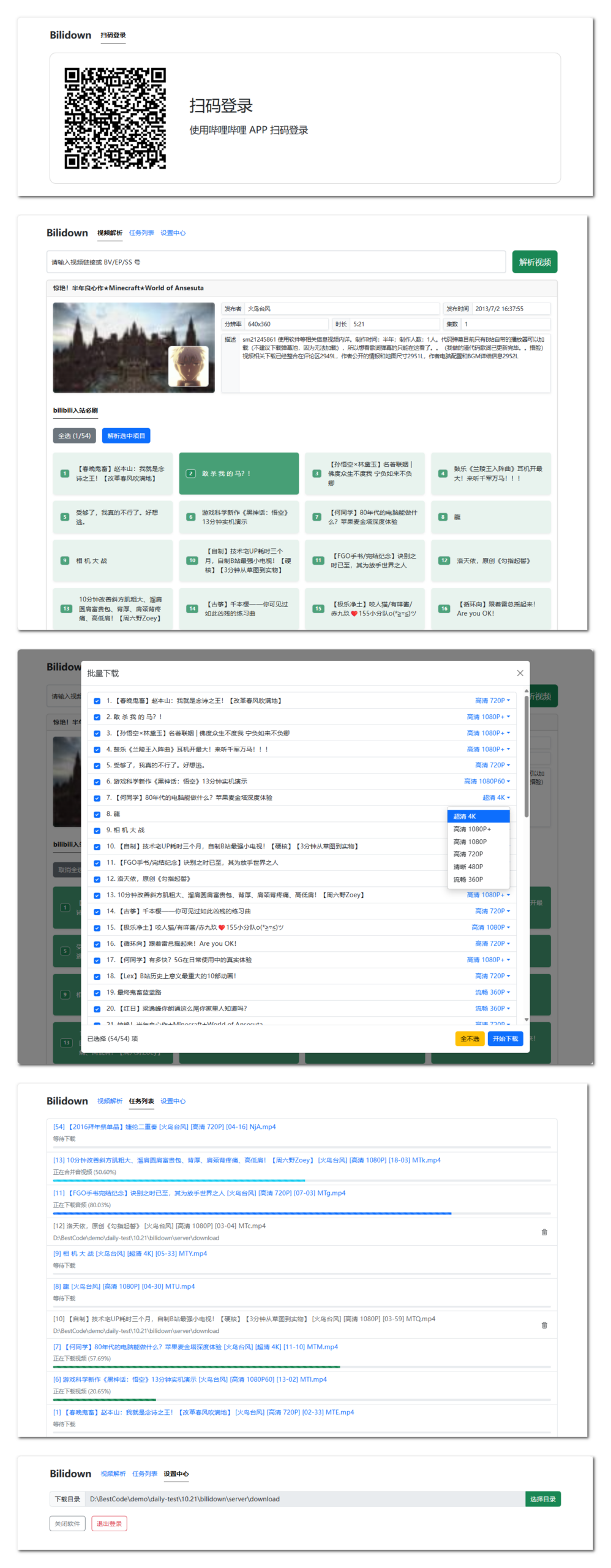
    软件界面

    Star History

    Star History Chart

    Visit original content creator repository
  • CloudFirewall

    CloudFirewall

    What is it?

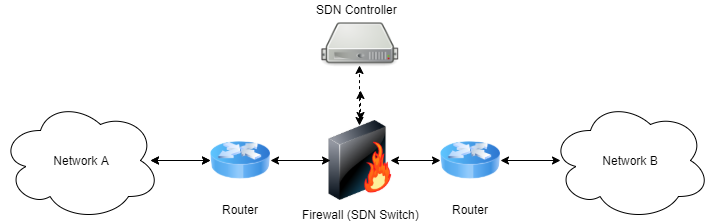
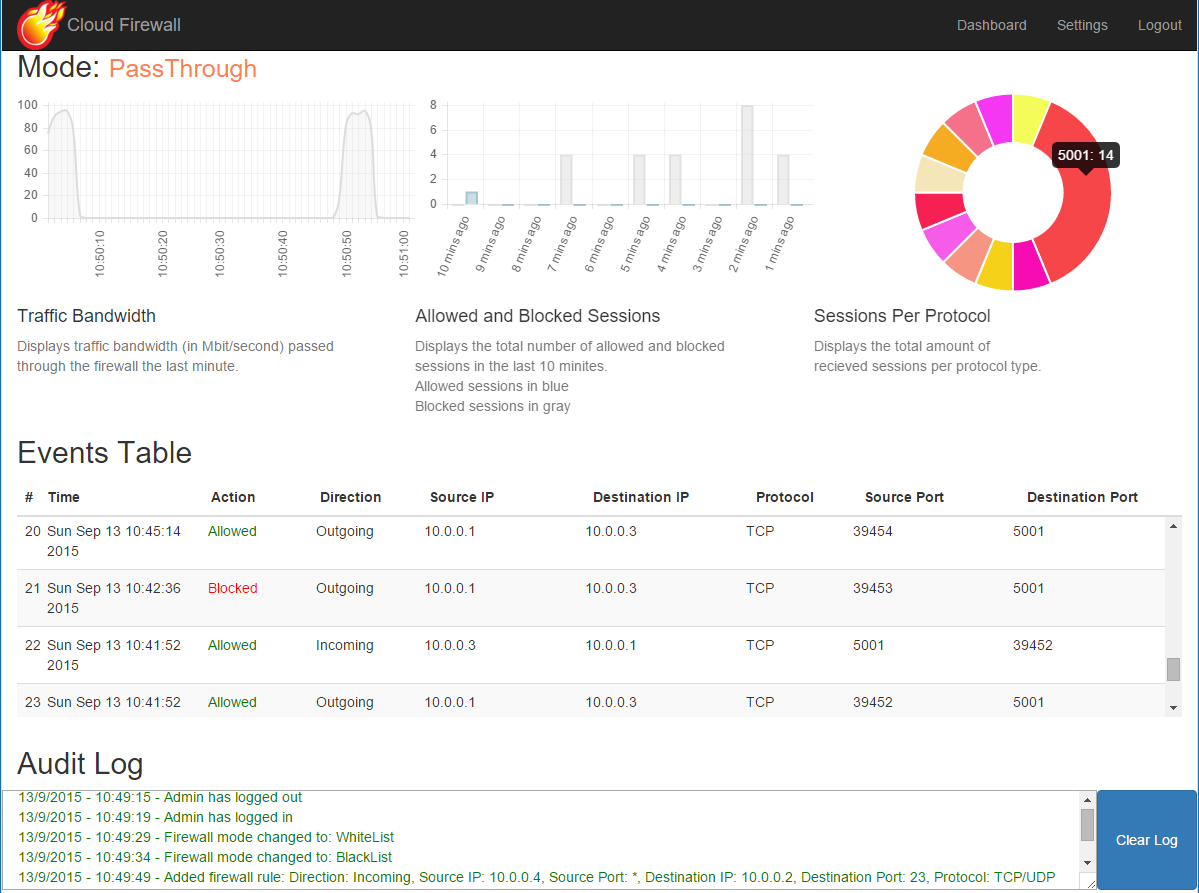
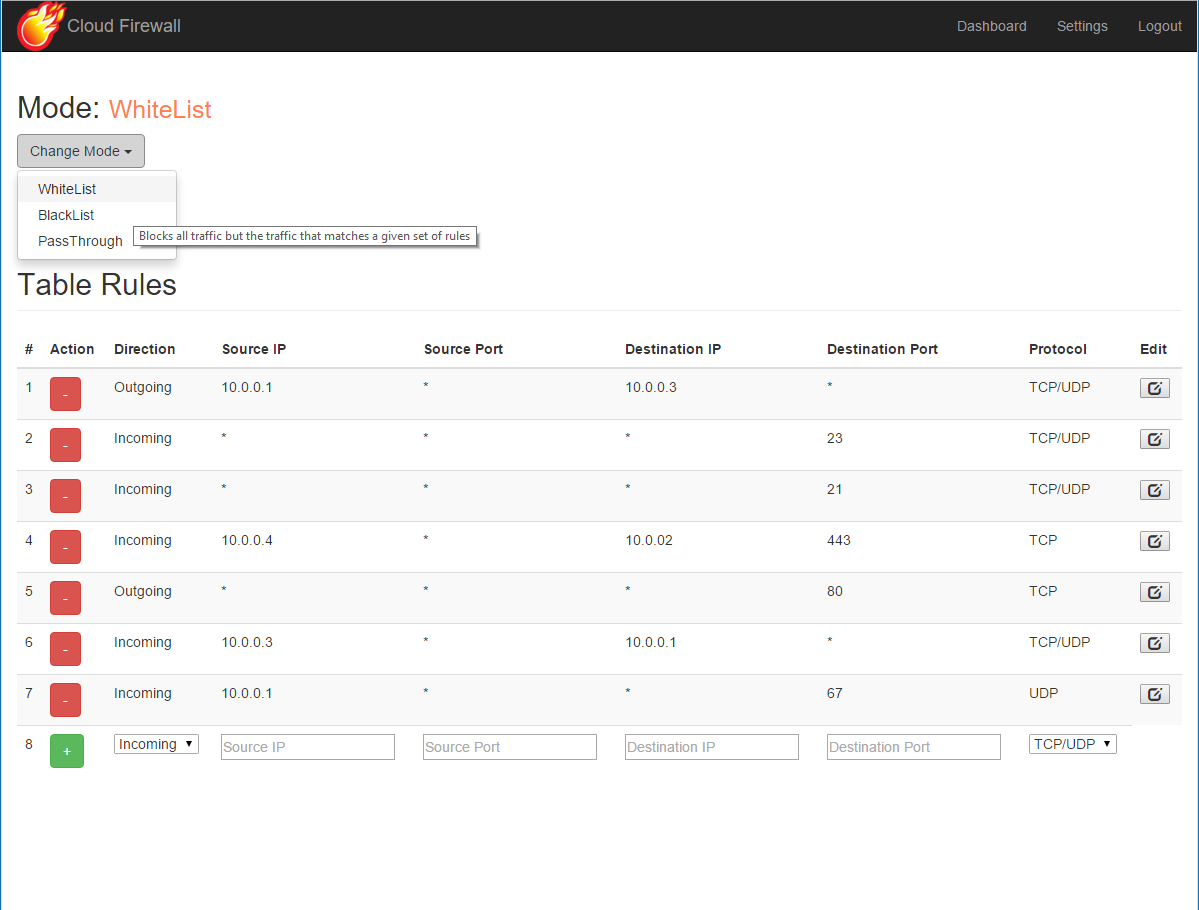
    CloudFirewall is a simple, SDN based firewall, which can be used in order to forward or block certain types of traffic between two different networks. It supports three different work modes: black-list based blocking, white-list based forwarding, and a pass-through mode which forwards all traffic, but still gathers different statistics on it. It also features a simple web based UI which can be used to manage settings and inspect statistics on the network traffic and the firewall’s functionality.


    How does it work?

    CloudFirewall is implemented as an SDN controller, which is programmed to forward or block certain TCP/UDP flows, where a TCP/UDP flow can be uniquely identified by the five-tuple of < source IP, destination IP, transport protocol type, source port, destination port >. This SDN controller controls, using the OpenFlow protocol, an underlying SDN switch which interconnects two different networks. CloudFirewall interconnecting two different networks

    Whenever a packet starting a new flow is received at this switch, it forwards it to the controller, which in turn decides whether this flow should be forwarded to the other network or otherwise blocked altogether. This decision based upon the firewall’s current work mode (white-list / black-list / pass-through) and its current defined rules set. When such decision is made by the controller, it installs an appropriate forwarding rule in the switch so that future packets belonging to the same flow will be handled in the same manner.


    The internals

    The implementation consists of two different parts:

    The SDN firewall:

    As explained above, the firewall is implemented as an SDN controller. It is written in Python and is built above the POX framework. It exposes an XML-RPC based API which allows manipulating the firewall’s behavior (i.e: changing the firewall’s work mode, adding and removing forwarding rules). See this API file for a complete functions list. You can find the firewall’s source code under the sdn-fw folder.

    The web UI:

    The firewall’s UI is implemented as a web application. It’s back-end is written in Python above the Flask micro-framework. It exposes a RESTful API which allows manipulating the firewall’s settings, i.e: changing it’s current work mode, adding or removing forwarding rules, etc. It also allows querying for certain statistical and event based information regarding the traffic passed through the firewall (i.e: detailed information on flows that were recently blocked by the firewall). You can experiment with the RESTful API by invoking the api_tester.py script.

    The front-end is simplemented as a single page application, and is written in HTML/CSS/JS. For rendering the visual charts, we used the charts.js library. You can find the code unser the cloudfirewall folder.

    CloudFirewall's internal structure


    Installation

    The easiest way to experiment with CloudFirewall is to set it up on a Mininet network. We provided a simple Mininet network topology file that you use to easily create a network that consists of two LANs, interconnected by CloudFirewall.

    In order to setup this network follow the next steps:

    1. Install Mininet v2.1.0 64bit on your target machine using the instructions found here. Alternatively, simply grab the preinstalled Mininet 2.1.0 64 bit VM (make sure you get the right version).

    2. Install POX on your target machine by following the instructions found here. Note: the Mininet VM comes with POX preinstalled, so skip this step if you chose to use this VM.

    3. Make sure POX is on the dart branch by entering the POX folder (/home/mininet/pox in the Mininet preinstalled VM) and running:

       git checkout dart
      
    4. Clone CloudFirewall’s git repository by running:

       git clone https://github.com/matanby/CloudFirewall.git
      
    5. Install Python development tools and PIP by running:

       apt-get install -y python-dev python-pip
      
    6. Install all package dependencies by running:

       sudo pip install -r CloudFirewall/requirements.txt
      
    7. Run the SDN firewall:

       cd CloudFirewall/sdn-fw/
       chmod +x ./run_fw.sh
       ./run_fw.sh
      

    Note: the run_pox.py script is configured to run POX from /home/mininet/pox, if you have POX installed in some other path, edit this file and change it accordingly. 8. Run Mininet with the sample network topology provided:

        cd CloudFirewall/sdn-fw/test/
        chmod +x ./run_mininet.sh
        ./run_mininet.sh
    
    1. Run the UI web application:

       cd CloudFirewall/cloudfirewall/
       python app.py
      
    2. Access the UI by entering: http://[MININET_HOST_IP]:5000


    Screenshots

    Here are a couple of screenshots of the web UI:

    The dashboard: CloudFirewall's dashboard

    The settings section: CloudFirewall's settings section


    Credits

    This project was created by Matan Ben-Yosef and Nir Parisian as a part of the course Advanced Operating Systems & Cloud Technologies (67788), instructed by Dr. Yaron Weinsberg and Prof. Danny Dolev, in spring semester of 2015, Hebrew University Of Jerusalem.


    Visit original content creator repository
  • Principle-Concepts-of-Computer-Vision

    Principles of Computer Vision for AI

    Author

    Matthias Bartolo 0436103L

    Preview:

    Description of Task:

    Through the following tasks, a deeper understanding of computer vision was achieved, with a particular focus on tools and frameworks that enabled its implementation:

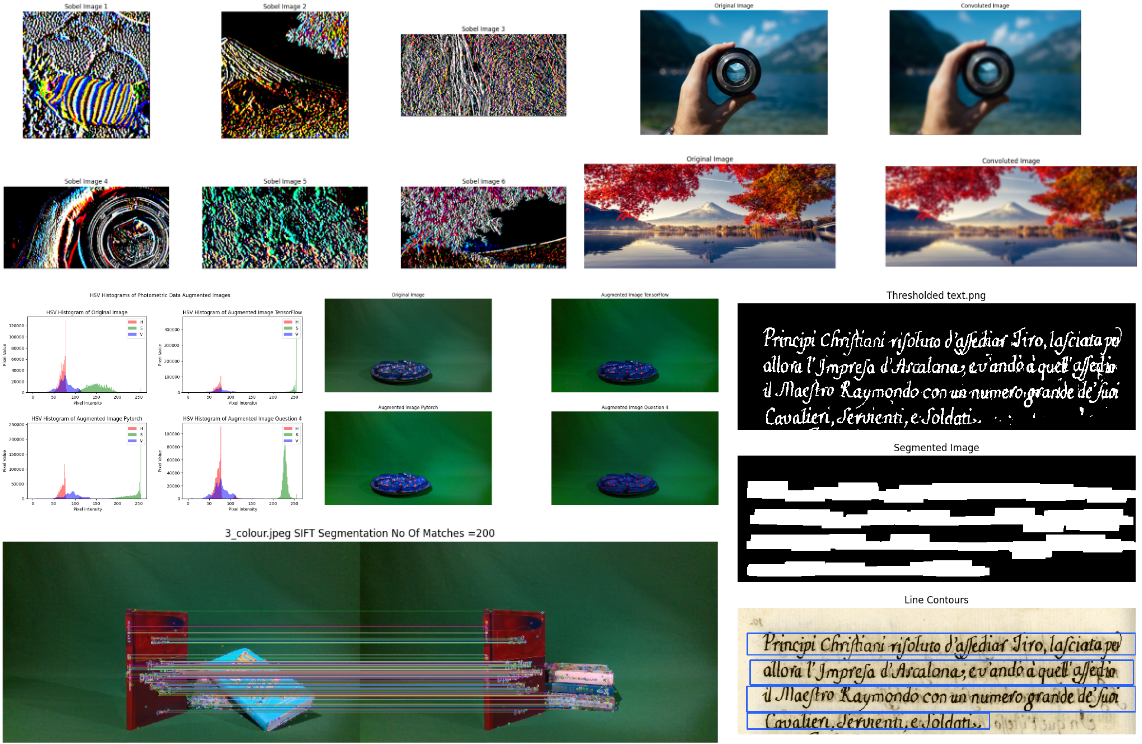
    In the first part of the task, a variety of Data Augmentation techniques in computer vision were explored, encompassing both theoretical and practical aspects. The objectives involved investigating the concept of data augmentation, conducting a comprehensive review of relevant literature, implementing selected techniques using TensorFlow, PyTorch, and OpenCV, and evaluating the performance of augmented images in comparison to other approaches and the original images. Valuable insights into the potential and effectiveness of data augmentation techniques in computer vision were obtained.

    In the second part of the task, various tutorials were followed to delve into specific tasks that enhance computer vision capabilities. This endeavor involved experimenting with a wide range of techniques, including both Point Processing and Area Processing. Convolution techniques, including sobel kernel, box filter, and gaussian kernel, were studied, as they play a fundamental role in tasks such as edge detection and smoothing. Additionally, Morphology operations like dilation, erosion, opening, closing, and text segmentation were explored, which are crucial for image processing tasks like noise removal, shape detection, and text extraction. Feature Detection techniques, such as Corner Harris, Sci Thomasi, SIFT, SURF, and ORB, were also examined, as they enable the identification and extraction of distinctive features for tasks like object recognition and tracking.

    data augmentation image

    By completing these tasks, the project achieved a comprehensive understanding of computer vision principles and techniques. The exploration of data augmentation techniques, along with the utilization of tools and frameworks, provided valuable insights into the potential and effectiveness of computer vision applications.

    Deliverables:

    The repository includes the Computer Vision Tutorials and Group Project.

    Visit original content creator repository
  • simple-ca

    Simple CA

    This tool is a simple CA intended to be executed via cli and http.

    Mainly intended for development/testing environments.

    Build executable

    go build

    Update config.yml

    data_directory: ./tmp/
    http_server:
        listen_address: 127.0.0.1
        listen_port: 5000
    all_ca_configs:
        ca_1:
            subject:
                common_name: My CA 1
                country:
                    - IT
                organization:
                    - ACME Corp
                organizational_unit:
                    - PKI
                locality: []
                province: []
                street_address: []
                postal_code: []
            validity:
                years: 1
                months: 1
                days: 10
            key_config:
                type: rsa
                config:
                    size: 4096
            crl_ttl: 12h
            permitted_dns_domains_critical: true
            permitted_dns_domains: []
            excluded_dns_domains: []
            permitted_ip_ranges:
                - 192.168.0.0/16
                - 10.0.0.0/8
            excluded_ip_ranges: []
            permitted_email_addresses: []
            excluded_email_addresses: []
            permitted_uri_domains: []
            excluded_uri_domains: []
            http_server_options:
                users:
                    my_user: my_pass
    

    Bootstrap CAs

    ./simple-ca

    Local use

    Generate csr using openssl

    openssl req \
        -nodes \
        -subj "/CN=www.example.com" \
         -addext "subjectAltName = DNS:www.example.com , DNS:www2.example.com" \
        -addext "extendedKeyUsage = serverAuth, clientAuth" \
        -addext "keyUsage=keyEncipherment" \
        -newkey rsa:2048 \
        -keyout ${KEYS_DIR}/www.example.com.key.pem \
        -out ${CSRPOOL}/www.example.com.csr.pem
    
    
    openssl req \
        -in ${CSRPOOL}/www.example.com.csr.pem \
        -noout \
        -text

    Sign all CSRs and generate new CRL

    ./simple-ca

    HTTP server

    Run

    ./simple-ca http

    Requests

    openssl req \
        -nodes \
        -subj "/CN=www.example.com" \
         -addext "subjectAltName = DNS:www.example.com , DNS:www2.example.com" \
        -addext "extendedKeyUsage = serverAuth, clientAuth" \
        -addext "keyUsage=keyEncipherment" \
        -newkey rsa:2048 \
        -keyout ${KEYS_DIR}/www.example.com.key.pem \
        -out ${CSR_DIR}/www.example.com.csr.pem
    
    
    openssl req \
        -in ${CSR_DIR}/www.example.com.csr.pem \
        -noout \
        -text
    
    CA_ID=ca_1
    
    curl \
        -sSLf \
        -T ${CSR_DIR}/www.example.com.csr.pem \
        --user my_user:my_pass \
        -X POST \
        http://localhost:5000/ca/$CA_ID/csr/sign
    
    curl \
        -sSLf \
        --user my_user:my_pass \
        -X POST \
        http://localhost:5000/ca/$CA_ID/crt/revoke/12345

    Visit original content creator repository